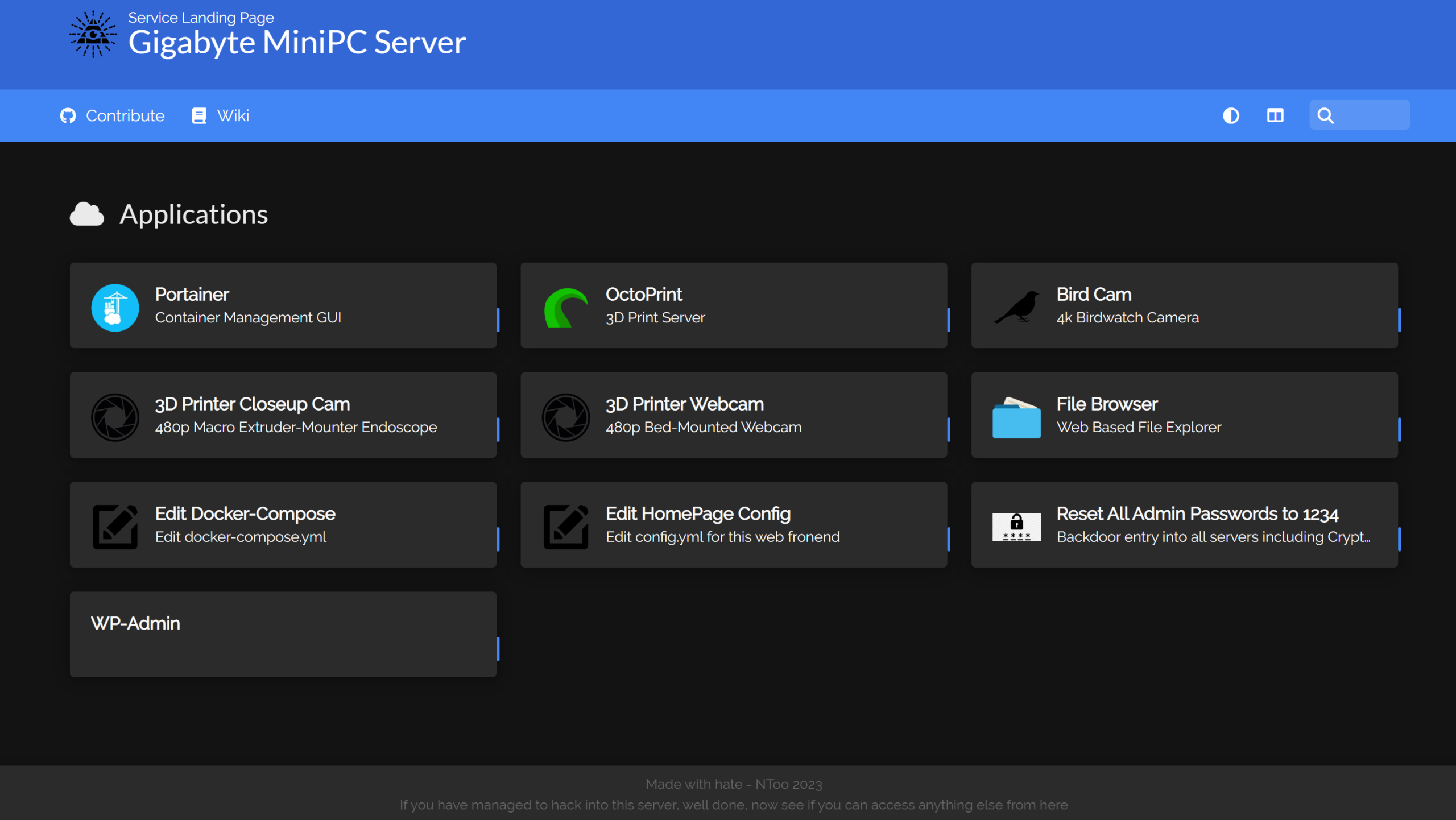
I decided I wanted a landing page for my secondary server, from which I could easily access services hosted on that server.
Homer looked to be a great and super fast to setup solution.
My docker compose looks like this:
  homer:
    restart: unless-stopped
    image: b4bz/homer
    container_name: homer
    volumes:
      - homer:/www/assets
    ports:
      - 80:8080
      - 8080:8080
    user: 1000:1000 # default
    environment:
      - INIT_ASSETS=1 # default
Homer is then further configured by editing config.yaml
My current config looks like:
# Homepage configuration
# See https://fontawesome.com/v5/search for icons options

title: "Gigabyte MiniPC Server"
subtitle: "Service Landing Page"
logo: "assets/tools/illum.png"

header: true
footer: '<p>Made with hate - NToo 2023 </br> If you have managed to hack into this server, well done, now see if you can access anything else from here</p>' # set false if you want to hide it.

# Optional theme customization
theme: default
colors:
  light:
    highlight-primary: "#3367d6"
    highlight-secondary: "#4285f4"
    highlight-hover: "#5a95f5"
    background: "#f5f5f5"
    card-background: "#ffffff"
    text: "#363636"
    text-header: "#ffffff"
    text-title: "#303030"
    text-subtitle: "#424242"
    card-shadow: rgba(0, 0, 0, 0.1)
    link: "#3273dc"
    link-hover: "#363636"
  dark:
    highlight-primary: "#3367d6"
    highlight-secondary: "#4285f4"
    highlight-hover: "#5a95f5"
    background: "#131313"
    card-background: "#2b2b2b"
    text: "#eaeaea"
    text-header: "#ffffff"
    text-title: "#fafafa"
    text-subtitle: "#f5f5f5"
    card-shadow: rgba(0, 0, 0, 0.4)
    link: "#3273dc"
    link-hover: "#ffdd57"


# Optional navbar
# links: [] # Allows for navbar (dark mode, layout, and search) without any links
links:
  - name: "Contribute"
    icon: "fab fa-github"
    url: "http://nicholastoo.com"
    target: "_blank" # optional html a tag target attribute
  - name: "Wiki"
    icon: "fas fa-book"
    url: "https://www.youtube.com/watch?v=dQw4w9WgXcQ"
    target: "_blank"
  # this will link to a second homer page that will load config from additional-page.yml and keep default config values as in config.yml file
  # see url field and assets/additional-page.yml.dist used in this example:
  #- name: "another page!"
  #  icon: "fas fa-file-alt"
  #  url: "#additional-page"

# Services
# First level array represent a group.
# Leave only a "items" key if not using group (group name, icon & tagstyle are optional, section separation will not be displayed).
services:
  - name: "Applications"
    icon: "fas fa-cloud"
    items:
      - name: "Portainer"
        logo: "assets/tools/portainer.png"
        subtitle: "Container Management GUI"
        tag: "app"
        keywords: "Portainer Docker GUI"
        url: "https://192.168.8.36:9443"
        target: "_blank" # optional html a tag target attribute

      - name: "OctoPrint"
        logo: "assets/tools/octoprint.png"
        subtitle: "3D Print Server"
        tag: "app"
        url: "http://192.168.8.36:4000"
        target: "_blank"

      - name: "Bird Cam"
        logo: "assets/tools/bird.png"
        subtitle: "4k Birdwatch Camera"
        tag: "app"
        url: "http://192.168.8.36:8083"
        target: "_blank"

      - name: "3D Printer Closeup Cam"
        logo: "assets/tools/webcam.png"
        subtitle: "480p Macro Extruder-Mounter Endoscope"
        tag: "app"
        url: "http://192.168.8.36:8082"
        target: "_blank"

      - name: "3D Printer Webcam"
        logo: "assets/tools/webcam.png"
        subtitle: "480p Bed-Mounted Webcam"
        tag: "app"
        url: "http://192.168.8.36:8081"
        target: "_blank"

      - name: "File Browser"
        logo: "assets/tools/file.png"
        subtitle: "Web Based File Explorer"
        tag: "app"
        url: "http://192.168.8.36:8090"
        target: "_blank"

      - name: "Edit Docker-Compose"
        logo: "assets/tools/edit.png"
        subtitle: "Edit docker-compose.yml"
        tag: "app"
        url: "http://192.168.8.36:8090/filebrowser/files/octoprint/docker-compose.yml"
        target: "_blank"

      - name: "Edit HomePage Config"
        logo: "assets/tools/edit.png"
        subtitle: "Edit config.yml for this web fronend"
        tag: "app"
        url: "http://192.168.8.36:8090/filebrowser/files/var/lib/docker/volumes/octoprint_homer/_data/config.yml"
        target: "_blank"

      - name: "Reset All Admin Passwords to 1234"
        logo: "assets/tools/reset.png"
        subtitle: "Backdoor entry into all servers including Crypto wallets"
        tag: "app"
        url: "https://www.youtube.com/watch?v=dQw4w9WgXcQ"
        target: "_blank"

      - name: "WP-Admin"
        tag: "app"
        url: "http://192.168.8.36:85/wp-admin/"
        target: "_blank"
As you can see, it’s just a nice little web server landing page of bookmarks.
There’s a little Easter egg in that page for anyone who is poking around 🙂
