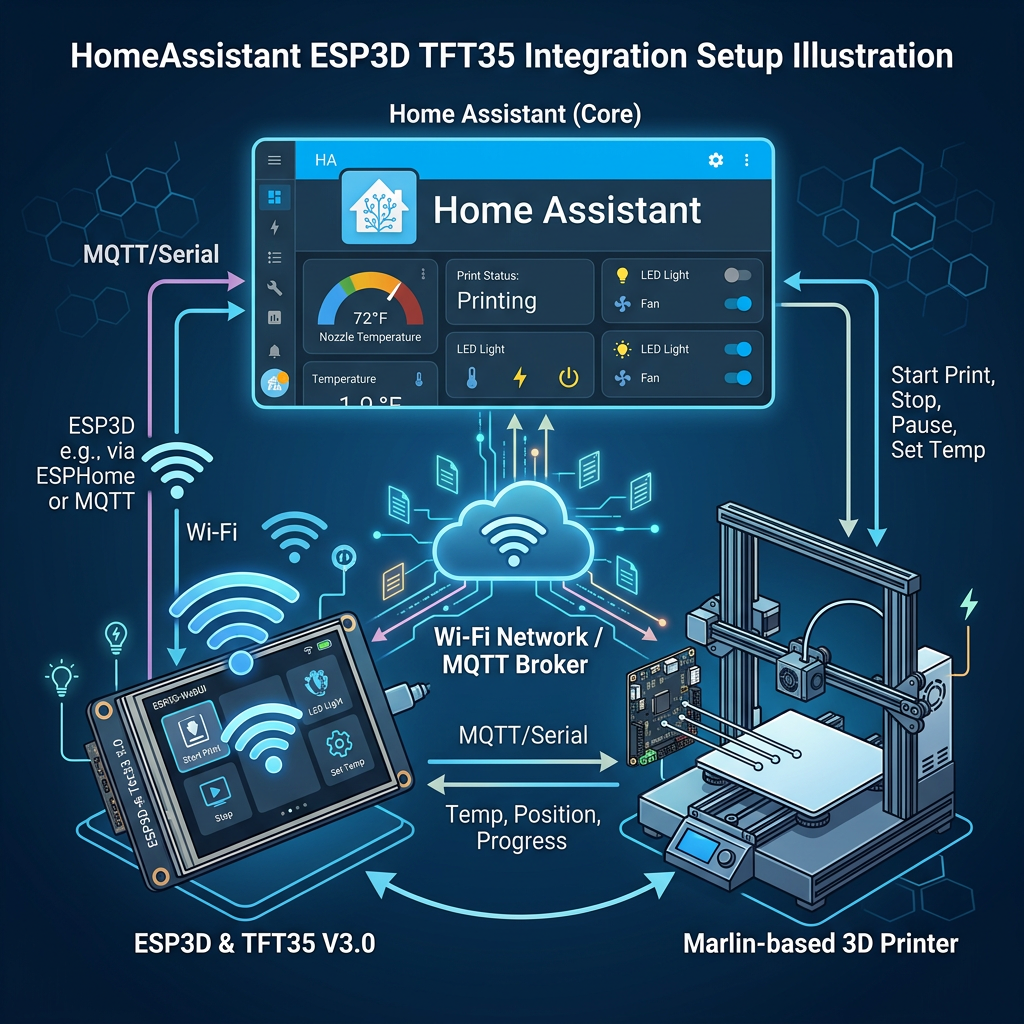
My print progress sensor has been quietly lying to me for months. The esp3d-homeassistant integration talks to a serial-to-WiFi adapter on the printer and exposes temperatures, position, and print status as Home Assistant entities. The problem is that it was originally built around printing from the printer’s own SD card: it polls M27 on a timer, Marlin replies with something like SD printing byte 123/12345, and the integration turns that byte ratio into a progress percentage.
That’s fine if the printer’s actually managing an SD print job internally. Mine isn’t. I print over USB from the TFT35 in touch mode, which means the print job lives on the host side (the TFT), not in Marlin’s own SD state machine. Poll M27 in that setup and you just get Not SD printing back forever, since from Marlin’s point of view, that’s true. The old progress sensor had nothing to work with and just sat there.
Where the actual progress data lives instead
Marlin has a separate, unrelated feature called M73_REPORT that isn’t tied to SD printing at all. Most slicers (PrusaSlicer, Cura, etc.) already embed M73 P<percent> R<minutes> commands into the gcode itself at each layer change, as a purely informational progress marker. With M73_REPORT enabled in the firmware, Marlin echoes that straight back out over serial every time it processes one:
echo: M73 Progress: 2%; Time left: 335m;Crucially, this happens regardless of whether the print is running from SD, from a host over USB, or from a TFT acting as its own host: it’s baked into the gcode file itself, not derived from Marlin’s internal SD file position. That’s exactly the signal I needed: something that fires the same way no matter where the print job is actually being driven from.
The actual code change
The integration already had a small internal event-bus pattern: each incoming serial line gets run through a set of parser functions, and each parser emits typed events that sensors subscribe to. So the fix slots into that same shape rather than needing anything new architecturally. First, a new parser:
def parse_m73(self, input_string: str):
    # echo: M73 Progress: 2%; Time left: 335m;
    match = re.search(r"M73 Progress:\s*(\d+)%.*Time left:\s*(\d+)m", input_string)
    if match:
        progress, remaining = match.groups()
        self.event_emitter.emit(Event.M73_PROGRESS, int(progress))
        self.event_emitter.emit(Event.M73_REMAINING, int(remaining))
        self.event_emitter.emit(Event.IS_PRINTING, int(progress) > 0)
wired into the same line-processing loop as the existing parsers (SD status, temperatures, file list, and so on), and two new event types to carry the data:
M73_PROGRESS = auto()
M73_REMAINING = auto()
Making the progress sensor prefer M73, but not require it
Rather than replacing the old SD-byte-ratio logic outright, the existing PrintProgress sensor got a second data source layered on top, with M73 taking priority when it’s present:
def set_m73_progress(self, value):
    self.m73_progress = value
    self.schedule_update_ha_state()

@property
def state(self):
    if self.m73_progress is not None:
        return self.m73_progress
    if self.current_byte is not None and self.total_bytes is not None:
        return float(self.current_byte) / float(self.total_bytes) * 100
That fallback ordering matters: anyone still printing from SD card keeps getting the exact same byte-ratio behaviour as before, completely untouched. M73 data only takes over when it’s actually present, which for me is now on every single print, since it comes from the TFT/USB path rather than an SD job.
A genuinely trivial addition: the remaining-time sensor
The nice thing about the existing Base sensor class is that most simple sensors in this integration don’t need any custom logic at all; they just wire an event straight into a generic set_attr_native_value setter that the base class already provides. So the new PrintRemaining sensor is about as small as a sensor can be:
class PrintRemaining(Base):
    def __init__(self, esp3d: Esp3d):
        super().__init__(esp3d)
        self._attr_name = "Remaining"
        self._attr_icon = "mdi:timer-sand"
        self._attr_native_unit_of_measurement = "min"
        self.esp3d.event_emitter.on(Event.M73_REMAINING, self.set_attr_native_value)
No fallback logic needed here, since there’s no equivalent “remaining time” derivable from the old SD byte-ratio approach anyway; this one’s purely new.
Putting it to use: one automation, several jobs at once
With real progress data now flowing into Home Assistant, I built a single automation around it that handles four things at once: LED lighting for the print camera, timelapse capture, and a phone notification.
alias: Print Progress Notification
description: ""
triggers:
  - entity_id: sensor.print_progress
    trigger: state
conditions:
  - condition: numeric_state
    entity_id: sensor.print_progress
    above: 0
    below: 100
actions:
  - action: light.turn_on
    target:
      entity_id: light.led_strip
    data:
      brightness_pct: 100
  - delay:
      seconds: 1
  - action: camera.snapshot
    target:
      entity_id: camera.3d_print_cam
    data:
      filename: /config/www/print_progress.jpg
  - delay:
      seconds: 1
  - if:
      - condition: template
        value_template: >-
          {{ trigger.from_state is none or trigger.from_state.state in
          ['unknown','unavailable','none'] or (trigger.from_state.state |
          float(0)) <= 0 }}
    then:
      - action: input_text.set_value
        target:
          entity_id: input_text.print_job_id
        data:
          value: "{{ now().strftime('%Y%m%d_%H%M%S') }}"
      - action: rest_command.timelapse_start
        data:
          job_id: "{{ states('input_text.print_job_id') }}"
    continue_on_error: true
  - if:
      - condition: template
        value_template: >-
          {{ trigger.from_state is none or (trigger.from_state.state | float(0)
          | round(0)) != (trigger.to_state.state | float(0) | round(0)) }}
    then:
      - action: rest_command.timelapse_frame
        data:
          job_id: "{{ states('input_text.print_job_id') }}"
          percent: "{{ trigger.to_state.state | float(0) | round(0) | int }}"
    continue_on_error: true
  - action: notify.mobile_app_oneplus_10_pro
    data:
      title: >-
        🖨️ Print Progress | {{ ... }}%
      message: >
        {{ progress }}% | {{ h }}h {{ m }}m remaining
      data:
        tag: print_progress
        sticky: true
        image: /local/print_progress.jpg
        progress: "{{ states('sensor.print_progress') | float(0) | round(0) | int }}"
        progress_max: "100"
  - action: light.turn_on
    target:
      entity_id: light.led_strip
    data:
      brightness_pct: 1
It triggers on every state change of the new sensor.print_progress, gated to only run mid-print (above: 0, below: 100), so it stays quiet before the first layer and after completion. The LED strip gets bumped to full brightness for a second, just long enough to properly light the bed for the camera snapshot that follows, then dropped back down to a dim 1% afterward, rather than leaving a bright light glaring at the printer for the rest of the job.
The two if blocks tie this straight back into the 3D Print Timelapse add-on I wrote about separately: the first one detects the start of a print (the previous state was unknown/unavailable or effectively zero) and kicks off a new timelapse job with a fresh timestamp-based job_id; the second detects any actual percentage change and pushes that as a new frame, with round(0) on both sides of the comparison so it only fires once per whole percentage point, not on every noisy fractional update. Both are wrapped in continue_on_error: true, so if the timelapse app happens to be down or mid-restart, it doesn’t take the notification step down with it.
The notification itself reads both new sensors, sensor.print_progress and sensor.remaining, to build a live-updating Android notification: percentage, hours/minutes remaining, and the same camera snapshot as its image, with tag: print_progress so each update replaces the last one rather than stacking up a new notification every time the percentage ticks over.
The result
Two new entities show up: sensor.<device>_print_progress (which now updates properly on a USB/TFT print) and sensor.<device>_remaining, in minutes. Between those and the existing is_printing binary sensor, all the same Lovelace card examples and phone-notification automations from the original integration’s README work exactly the same as they always did; they just now actually have real data behind them for my setup, instead of a progress bar that never moved.